






Echo variable
VariableNo. 9295
Synopsis
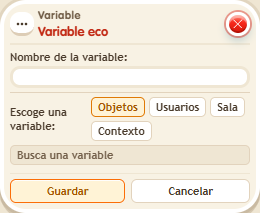
You pick a built-in or smart variable (for example, @position.x) and give it your own name to use in your texts and conditions. It always reads the real value at that moment, not a copy. It does not accept variables you created and keeps the original's permissions: if it was read only, it stays that way.
Step by step
Give your X coordinate a local name
Boxes you need
 TriggerTrigger: Say something
 AddonAddon: Variable value in text
 EffectEffect: Show message
- Open the Echo variable, click Users and select the X position variable “@position.x”. Name the echo “my_x” and save.
- On another tile, stack “Says something” = “where”, “Variable text” and “Show message”.
- In “Variable text”, select Users → my_x, the triggering user, numeric and individual output, and the name “my_x”. Set the message for that user to “x=$(my_x)”. Save everything.
- Say “where”, walk to another column of the island and say it again.
Result: Each message shows your current X coordinate. The echo reads the live position instead of storing a copy of the first number.
Settings
Notes
- Echo accepts internal or smart variables, not variables you created. It preserves the original permissions: renaming read-only data does not make it editable.
- An Echo variable only accepts internal or smart variables, not ones created by users.