






Condition: Has variable
ConditionNo. 9147
Synopsis
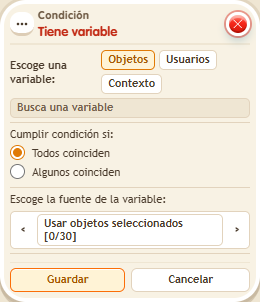
Choose the type, the variable and who is checked. A variable with value 0 still exists: only  Effect: Remove variable removes it. It is the way to represent keys, passes or completed quests, which you hand out with
  Effect: Give variable.
Step by step
Check that you have a key
Boxes you need
 TriggerTrigger: Say something
 TriggerTrigger: Step on an object
- ConditionCondition: Has variable
 EffectEffect: Show message
- EffectEffect: Give variable
- Stack “Says something” 9111, this condition and “Show message” 9185. Set the trigger to “hello”, exact match; set the effect to “Matched”, targeting the triggering user.
- Save a user variable
 9291 named “key”, with “Has a value” and “While the user is in the room”. In another stack, “Walks on object” 9117 selects a rug and “Give variable” 9237 gives “key” to the triggering user, initial 0, without overwriting.
 - In this condition choose Users, select “key” and use the triggering user. Leave the first matching option selected and save everything.
- Say “hello”, step onto the rug and say “hello” again.
Result: The message starts appearing after receiving the key.
Settings
Notes
- A variable with value 0 still exists. “Remove variable” deletes it.