






Addon: Execution limit
AddonNo. 9267
Synopsis
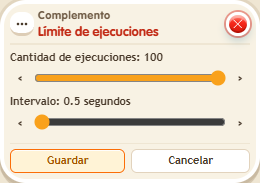
Set an amount and an interval in seconds: once the quota is used, the stack is skipped until the interval ends. The limit belongs to the whole stack, not a per-person counter. Great to stop someone spamming a button or a prize rug.
Step by step
Allow one activation every ten seconds
Boxes you need
 TriggerTrigger: Step on an object
- AddonAddon: Execution limit
 EffectEffect: Show message
- Place a walkable rug. On another tile, stack “Walks on object”, “Show message” and “Execution limit”. Pick the rug in the trigger.
- Set the message to “You passed”, addressed only to the triggering user. Set the extra to quantity 1 and interval 10 seconds. Save everything.
- Step on the rug, step off and return immediately. Wait ten seconds before trying again.
Result: The first visit shows the message, the immediate repeat is skipped and another is allowed after the interval.
Settings
Notes
- This test’s limit is shared by the stack; it is not a separate timer for each person.
- If your stack hits the cap, split it into several stacks or stack Addon: Execution limit: each one adds 100 more executions.