






Selector: Objects on objects
SelectorNo. 9241
Synopsis
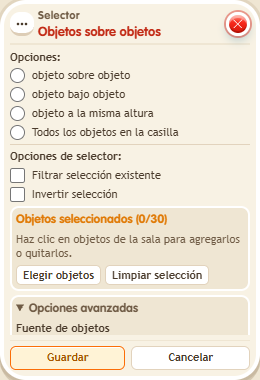
Select the reference objects and what to take, for example “All objects on the tile”, which includes the reference itself. The above and below options compare heights. Useful to move a whole tower or count what is on a base.
Step by step
Select objects on one tile
Boxes you need
 TriggerTrigger: Say something
- SelectorSelector: Objects on objects
 ConditionCondition: Selection count
 EffectEffect: Show message
- Place a BBox A and a stackable object B on the same tile. Put an object C on another tile; keep the test boxes away from A and B.
- On a separate tile, stack “Says something” = “count”, “Objects on objects”, “Selected quantity” and “Show message”.
- In “Objects on objects”, choose A as the reference, “All objects on the tile”, and leave filter and invert off.
- In “Selected quantity”, choose Objects → objects from selector, comparison “Equal to” and quantity 2. Set the message to “There are two”, for the triggering user only.
- Save everything and say “count”. Move B to another tile and repeat the word.
Result: First you receive “There are two”: the selection contains A and B. After moving B away, the message no longer appears.
Settings
Notes
- “All objects on the tile” includes the reference object itself. Above/below options compare heights.