






Selector: Users in area
SelectorNo. 9251
Synopsis
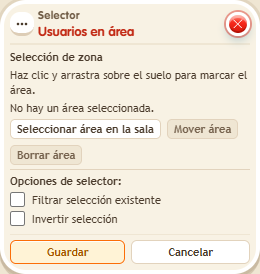
Click “Select area in the room” and drag over the floor; “Move area” shifts the rectangle without resizing it. The selection is worked out on every firing, so only those inside at that moment count. Ideal for start areas, finish lines or penalty boxes.
Step by step
Notify users inside an area
Boxes you need
 TriggerTrigger: Say something
- SelectorSelector: Users in area
 EffectEffect: Show message
- Choose two floor tiles as the test area. Ask one person to stand inside and another outside.
- Stack “Says something”, “Users in area” and “Show message” on the same tile. Set the trigger text to “select”.
- Open “Users in area”, click “Select area in the room” and drag to mark those two tiles. Release to return to the window. Leave filter and invert unchecked.
- In “Show message”, enter “Selected”, use “Users from selector” and the message mode addressed only to the user. Save every box and say “select”.
Result: Only users inside the area receive “Selected”.
Settings
Notes
- “Move area” lets you drag the rectangle from inside without changing its size; Cancel or Escape discards an unfinished move. Only Save stores the configuration. Selection is recalculated on every trigger: walking out changes who receives the next message.
- A repeater, timer or game start can trigger without a person. Add a user selector and use it as the target if you want to send users a message or teleport them.
- If you target selected users and the selector is empty, the effect reaches nobody. The person who triggered the stack is not used as a fallback.