






Addon: User name in text
AddonNo. 9269
Synopsis
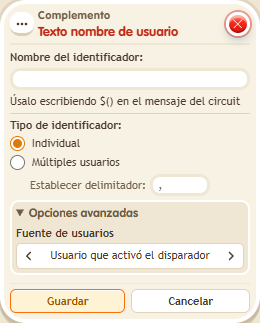
You define an identifier (for example, “who”) and write it as $(who) in a message. You choose the user source and whether it shows one name or a list; in a list names are separated by commas unless you set another separator. Each participant sees the right name. Great for personalised greetings and notices.
Step by step
Greet the speaker by name
Boxes you need
 TriggerTrigger: Say something
- AddonAddon: User name in text
 EffectEffect: Show message
- Stack “Says something” = “hello”, “User name text” and “Show message”.
- Set the extra’s identifier to “who”, type “Individual” and source “Triggering user”.
- Set the message to “Hello $(who)”, addressed only to the triggering user. Save and say “hello”.
Result: You read “Hello” followed by your keko’s name. Each participant sees their own name.
Settings
Notes
- Use the identifier inside $(...). The name inside the marker must match the extra’s identifier.
- In Addon: User name in text and
 Addon: Object name in text the text is “name”, a tab and the separator. Without a separator, “,” is used.