






Addon: Object name in text
AddonNo. 9270
Synopsis
It works like  Addon: User name in text but with objects: you define an identifier, for example “obj”, and write
 $(obj) in the message. The name comes from the catalogue. You can use the object that fired the trigger without selecting it again. Useful for notices like “You stepped on: …” or game inventories.
Step by step
Show the name of the stepped-on object
Boxes you need
 TriggerTrigger: Step on an object
- AddonAddon: Object name in text
 EffectEffect: Show message
- Place a walkable rug. Stack “Walks on object”, “Object name text” and “Show message” on another tile. Pick the rug in the trigger.
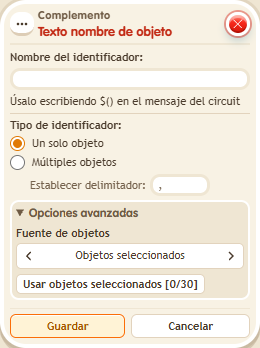
- In the extra, use identifier “obj”, type “Single object” and source “Triggering object”.
- Set the message to “You stepped on: $(obj)”, for the triggering user only. Save and step on the rug.
Result: The message includes the rug’s name from the catalogue.
Settings
Notes
- The source is the object that activated the trigger; you do not need to pick it again in the extra.
- In Addon: User name in text and Addon: Object name in text the text is “name”, a tab and the separator. Without a separator, “,” is used.