






Condition: Team rank
ConditionNo. 9165
Synopsis
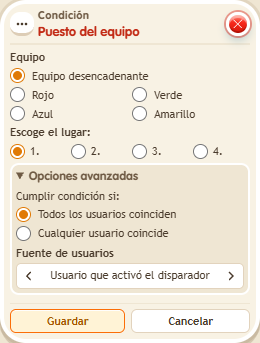
Choose the team and the position, for example 1 for the leader. With a fixed colour it is zone data and looks at nobody; with the triggering user’s team, a keko with no team does not pass. Ties are ordered by colour: red, green, blue and yellow.
Step by step
Check who is leading
Boxes you need
 TriggerTrigger: Say something
- ConditionCondition: Team rank
 EffectEffect: Show message
 EffectEffect: Control clock
 EffectEffect: Give team points
- Stack “Says something” 9111, this condition and “Show message” 9185. Set the trigger to “hello”, exact match; set the effect to “Matched”, targeting the triggering user.
- Set the condition to red team, rank 1.
- Place a “Game clock”
 9302. Create a stack with “Says something” 9111, exact text “start”, and “Control clock” 9231, Start action, selecting that clock.
 - Create another “Says something” stack, text “red”, with “Give team points” 9195: add 5 points to red. Create another with text “blue” and add 10 to blue. Use exact matching in both triggers and save.
- Say “start”, “red” and “hello”: red has 5 points. Then say “blue” and “hello” again: blue now has 10.
Result: The message appears while red leads and stops once blue overtakes it.
Settings
Notes
- Run the check without tied scores and in a newly started game to compare ranks clearly.
- In team conditions, a fixed colour is a fact about the zone: it doesn't look at anyone.
- With “triggering user's team”, if the keko has no team the condition is not met.
- Ties between teams are broken by colour in this order: red, green, blue, yellow.