






Selector: Filter users by variable
SelectorNo. 9261
Synopsis
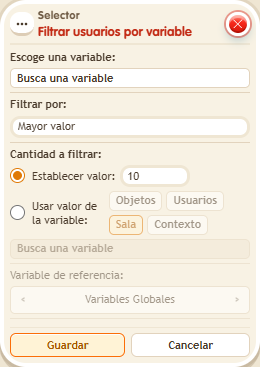
Filters the current selection by a variable: choose, for example, “Highest value” and how many to keep. Anyone without the variable is dropped, and ties are settled by a fixed order. Ideal to reward the leader or penalise the last place.
Step by step
Find the user with the most points
Boxes you need
 TriggerTrigger: Say something
- SelectorSelector: Filter users by variable
 SelectorSelector: Users by name
 EffectEffect: Give variable
 EffectEffect: Show message

- Configure an “User variable” named “points”, with a value. Prepare two people A and B.
- Create two setup stacks: “Says something” = “five” → “Give variable points”, initial value 5; “Says something” = “ten” → “Give variable points”, initial value 10. Both target the triggering user. A says “five” and B says “ten”. Do not overwrite values.
- In the test stack, combine “Says something” = “select”, “Users by name” (choose A and B), “Filter users by variable” and “Show message”. In the filter, choose “points”, “Highest value” and fixed quantity 1.
- In “Show message”, enter “Selected”, use “Users from selector” and the message mode addressed only to the user. Save every box and say “select”.
Result: B receives the message because they have 10 points; A is excluded.
Settings
Notes
- The filter excludes targets without the variable. Ties are resolved by identifier.
- Filter boxes always run after the selectors, regardless of height.
- Selector: Filter users by variable drops anyone without the variable even if there's room left. Ties are broken by id.