






Condition: Clock time
ConditionNo. 9180
Synopsis
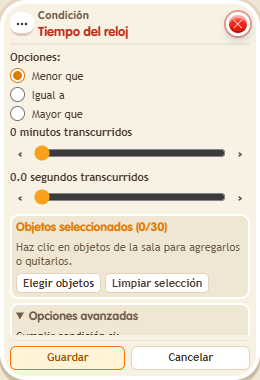
Select the  Circuits clock, the comparison and the minutes and seconds. It reads that clock, not the timer reset by
  Effect: Reset timers. Use it to reward fast answers, open paths mid-game or close a phase when time runs out.
Step by step
Wait for the clock to pass 30 seconds
Boxes you need
 TriggerTrigger: Say something
- ConditionCondition: Clock time
 EffectEffect: Show message
 EffectEffect: Control clock
- Stack “Says something” 9111, this condition and “Show message” 9185. Set the trigger to “hello”, exact match; set the effect to “Matched”, targeting the triggering user.
- Place a “Game clock” 9302. Select it in the condition and choose “Greater than”, 0 minutes and 30 seconds.
- In another stack configure “Says something” 9111, exact text “start”, and “Control clock” 9231, Start action, selecting the same clock. Save everything.
- Using a freshly started clock, say “start” and immediately say “hello”. Once it shows more than 30 seconds, say “hello” again.
Result: The first check shows no message; the check after 30 seconds does.
Settings
Notes
- This box reads the selected clock. It differs from conditions that measure time since “Reset timers”.