






Trigger: Object hits object
TriggerNo. 9310
Synopsis
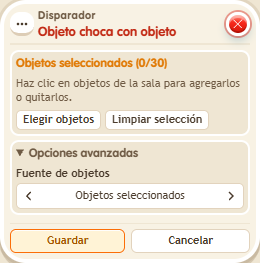
Both objects must be chosen, the one that moves and the one already there; with none chosen it never fires. The triggering user is the keko closest to the collision. Ideal for bowling, object races or pushing mechanisms.
Step by step
Detect objects colliding
Boxes you need
- TriggerTrigger: Object hits object
 TriggerTrigger: Say something
 EffectEffect: Move object to object
 EffectEffect: Show message
- Place object A and BBox B. Stack A: “Says something” 9111 = “move” and “Object to object” 9234. Use the primary selection for A under objects to move, and the secondary selection for B under target object.
- Stack B: this box selecting both A and B, plus “Show message” 9185, text “Arrived”. Target the triggering user and stand near B. Save everything.
- Say “move” so the effect moves A onto B.
Result: The keko nearest the collision receives “Arrived”.
Settings
Notes
- Both objects must be selected. With no selected objects, this trigger never fires.
- In Trigger: Object hits object both objects must be chosen, the one that moved and the one already there. With nothing chosen, it never fires.
- In Trigger: Object hits object, the triggering user is the keko closest to the collision.