






Condition: User direction
ConditionNo. 9171
Synopsis
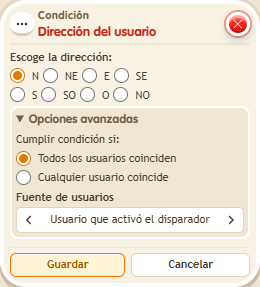
Choose the direction and who is checked. Walking can change where the keko faces, so check right after turning it, for example with  Effect: Move and rotate user. Useful for aiming games, duels or doors that only open when you face them.
Step by step
Check which way you face
Boxes you need
 TriggerTrigger: Say something
- ConditionCondition: User direction
 EffectEffect: Show message
- EffectEffect: Move and rotate user
- Stack “Says something” 9111, this condition and “Show message” 9185. Set the trigger to “hello”, exact match; set the effect to “Matched”, targeting the triggering user.
- Choose direction E and the triggering user in the condition.
- In another stack, configure “Says something” 9111 with “turn”, exact match, and “Move and rotate user” 9201: no movement, rotation E, triggering user. Save.
- Say “turn” and then “hello” without walking. Change the helper effect’s rotation to W, save, and repeat both words.
Result: The message appears while facing east and stops when facing west.
Settings
Notes
- Check orientation without walking between the commands: walking can change the way your avatar faces.