






Selector: Nearby users
SelectorNo. 9253
Synopsis
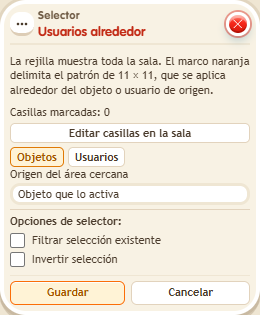
Paint a pattern of up to 11 × 11 with “Edit tiles in the room”; it moves with the source keko. “Origin” marks that keko’s tile, and “Paint” and “Erase” define where to look. Perfect for area attacks, greeting neighbours or tag games.
Step by step
Select the keko on a neighbouring tile
Boxes you need
 TriggerTrigger: Say something
- SelectorSelector: Nearby users
 EffectEffect: Show message
- Stand next to another person, one tile apart on the X axis. Leave another person farther away.
- Stack “Says something” = “select”, “Nearby users” and “Show message”.
- Open “Nearby users”, choose “Users”, then “Triggering user” as the neighborhood source. Click “Edit tiles in the room”.
- Use “Move preview” to place the center of the outline on your tile. Choose “Origin” and mark that same tile: it will be the pattern's reference when triggered.
- Use “Paint” to mark only the neighboring person's tile. Remove any other marks with “Erase”. Click “Done” to return to the window.
- In “Show message”, enter “Selected”, use “Users from selector” and the message mode addressed only to the user. Save every box and say “select”.
Result: Only the person at 1,0 relative to the speaker receives the message.
Settings
Notes
- The outline marks an 11 × 11 pattern relative to the source user, not a fixed room area. “Origin” marks the tile that will match that user; it does not move the painted tiles. “Move preview” only changes where you see the pattern, without changing its origin or saved configuration. Done or Escape returns to the window with your draft; only Save stores it. Leave filter and invert unchecked.