






Effect: Move user to object
EffectNo. 9235
Synopsis
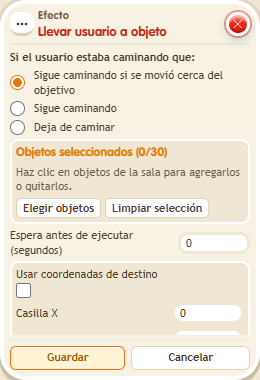
The keko appears on one of the target objects. With “Stop walking” they halt and do not continue a previous route. In BoomBang you can also enable coordinate targets and, with no objects chosen, place them on an X,Y tile (any floor, even if occupied). Useful for exits, starting points or traps.
Step by step
Move a keko to a destination and stop
Boxes you need
 TriggerTrigger: Say something
- EffectEffect: Move user to object
- Place a walkable object B on a clear tile. Stack “Says something” (“destination”) and “Move user to object”.
- Select only B as the destination and choose the triggering user.
- Choose “Stop walking”, leave coordinate targeting disabled and save with delay 0.
- Say “destination” from another tile.
Result: The keko is placed at B and does not continue an earlier route.
Settings
Notes
- To use X,Y instead of objects, enable coordinate targeting and leave destination objects unselected.
- Effect: Move user to object with no objects and a tile X,Y puts the keko on that tile (any floor) and they stop walking. If another keko is on that tile, they do not move: one keko per tile.