






Addon: Status bar
AddonNo. 9277
Synopsis
It goes on the same tile as the box that defines the variable. You choose a style such as “Energy”, the minimum and maximum, when it shows and for whom. There is a maximum of five displays per stack. Useful for energy, hunger or any resource in your game.
Step by step
An energy bar for your game
Boxes you need
 TriggerTrigger: Say something
- AddonAddon: Status bar
 EffectEffect: Give variable

- Configure a “User variable” named “energy”, with a value and “While in the room” availability. Put this extra on the same tile as the variable.
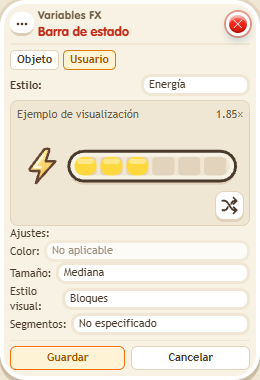
- Open the visual extra. Choose Users in the header and style “Energy”. Set Min 0 and Max 100. Set display to “Always visible” and audience to “Everyone”. Save.
- On another tile, stack “Says something” = “bar” and “Give variable”. Choose “energy”, triggering user, initial value 50, no overwrite. Save and say “bar” with a keko who does not have that variable yet.
Result: The energy bar above your keko is half full.
Settings
Notes
- The variable is linked by sharing its tile; this window has no main variable picker. Test each extra separately: a stack supports at most five visual displays.