






Addon: Projectile
AddonNo. 9287
Synopsis
It launches nothing by itself: the movement effect does the moving and this addon shapes it as a projectile. You choose which object is the projectile, the trajectory (for example, “Curved”), the strength and the distance. When freshly placed it applies a curve of 50 to everything the stack moves. Great for balls, arrows or snowballs.
Step by step
Animate an object as a projectile
Boxes you need
 TriggerTrigger: Say something
- AddonAddon: Projectile
 EffectEffect: Move and rotate object
- Place an object with several free tiles to its right. On another tile stack “Says something” = “move” and “Move and rotate object”. In the effect, manually select that object, movement right, no rotation and delay 0.
- Add “Projectile”. Under “The projectile”, manually select the same object as in the movement effect.
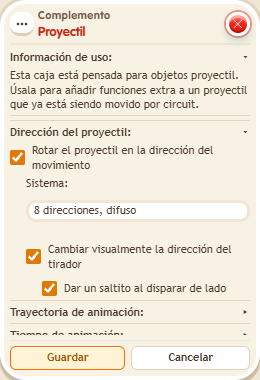
- Choose “Curved” trajectory with strength 50 and “Normal” distance. Disable time scaling, changing the shooter’s direction and the hop. Do not add another curve or “Move without animation”.
- Save all boxes and say “move”. Wait for it to finish before repeating.
Result: The object moves along the chosen curve to the neighbouring tile.
Settings
Notes
- This extra does not launch objects by itself: the movement effect performs the move. If you choose another object as the projectile, these settings do not apply to the moving object.
- A freshly placed Addon: Projectile applies curve 50 to everything the stack moves.