






Trigger: Transaction failed
TriggerNo. 9132
Synopsis
Transactions are all or nothing: if one fails it is fully undone, the player keeps what they offered and nothing is charged. This box tells you about that failure, for example when chests or funds are missing. Select the contract and use it to explain to the player what happened.
Step by step
Detect a transaction without chests
Boxes you need
- TriggerTrigger: Transaction failed
 TriggerTrigger: Say something
 EffectEffect: Start transaction
 EffectEffect: Show message
- Configure a payment contract
 9303 for a specific payment of 5 gold. Save the element and contract.
 - Stack A: “Says something” 9111 = “try” and “Start transaction” 9217, Normal mode. Leave the Chests selection empty and select the contract under Contracts, secondary selection.
- Stack B: this box selecting that contract, with “Show message” 9185, “Failed”, to the triggering user. Save and say “try”.
Result: “Failed” appears and no payment is charged.
Settings
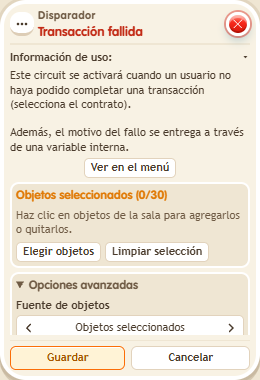
Notes
- The contract must be selected: omitting the contract as well tests a different error.
- If a transaction fails halfway (for example, the chest ran out of space), it's fully undone: the player keeps what they offered, gets nothing, the chests stay the same and Trigger: Transaction failed fires.
Related
Used in these recipes