






Condition: Object has no object on top
ConditionNo. 9154
Synopsis
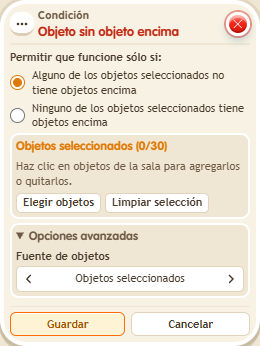
The opposite of  Condition: Object has another object on top: select the object underneath and the stack only continues if it is empty. Use it to check a base is free before placing something, or that a piece is still missing.
Step by step
A BBox with nothing on it
Boxes you need
 TriggerTrigger: Say something
- ConditionCondition: Object has no object on top
 EffectEffect: Show message
- Stack “Says something” 9111, this condition and “Show message” 9185. Set the trigger to “hello”, exact match; set the effect to “Matched”, targeting the triggering user.
- Place a BBox and select only that BBox in the condition. Leave the first matching option selected and save everything.
- Say “hello” with the BBox empty; place an object on it and repeat.
Result: The message appears with the empty BBox and stops when the object is placed on it.
Settings
Notes
- Select the lower object, not the object you will place on top.