






Condition: Do not match snapshot
ConditionNo. 9140
Synopsis
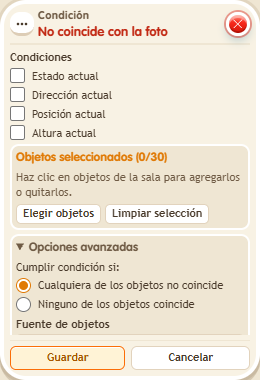
The opposite of  Condition: Match snapshot: the stack continues when something changed since the snapshot taken on save. Tick which aspects to compare, such as “Current position”. Use it to detect that someone moved a piece or that a puzzle is still unsolved.
Step by step
Detect a moved object
Boxes you need
 TriggerTrigger: Say something
- ConditionCondition: Do not match snapshot
 EffectEffect: Show message
- Stack “Says something” 9111, this condition and “Show message” 9185. Set the trigger to “hello”, exact match; set the effect to “Matched”, targeting the triggering user.
- Select an object. Check only “Current position” and save the condition to take its snapshot. Save the other boxes.
- Say “hello”, move the object to another tile with the editor without resaving the condition, then say “hello” again.
Result: The message appears after moving it.
Settings
Notes
- Resaving the condition updates its snapshot; do not do so between the two checks.
- The snapshot for Condition: Match snapshot is taken when you save the box. To update it, save again.