






Selector: Objects in area
SelectorNo. 9240
Synopsis
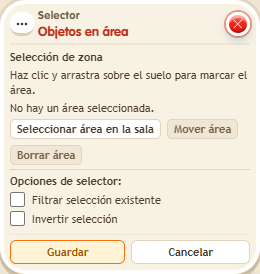
Click “Select area in the room” and drag over the floor; with “Move area” you can shift the rectangle without resizing it. Only “Save” keeps the changes. Use it to move, change or clear everything in one part of the zone.
Step by step
Move objects inside an area
Boxes you need
 TriggerTrigger: Say something
- SelectorSelector: Objects in area
 EffectEffect: Offset object position
- Place two ordinary objects on adjacent tiles and a third far away. Leave a free tile to the right of each.
- On a tile outside the area, stack “Says something”, “Objects in area” and “Move object by offset”. Set the trigger text to “move”.
- Open “Objects in area”, click “Select area in the room” and drag over the floor to include only the first two objects. Release to return to the window.
- In “Move object by offset”, use “Objects from selector”, X to the right by 1 tile, Y by 0 and delay 0. Save every box and say “move”. Keep each destination tile free.
Result: Both objects in the area move one tile; the third stays in place.
Settings
Notes
- “Move area” lets you grab inside the rectangle and drag it without changing its size. Cancel or Escape discards an unfinished move; only Save stores the configuration. Leave “Filter existing selection” and “Invert selection” unchecked for this test.