






Effect: Send signal
EffectNo. 9211
Synopsis
Stacks with  Trigger: Receive signal listening to the same
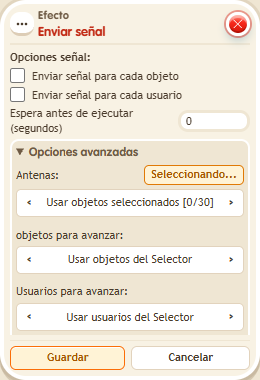
  Circuits antenna run and receive the users and objects carried by the signal. In the window you choose the antennas, which users or objects to send and whether to send one signal per object or user. It is how you connect distant stacks and build large machines.
Step by step
Send a signal between stacks
Boxes you need
 TriggerTrigger: Say something
- TriggerTrigger: Receive signal
- EffectEffect: Send signal
 EffectEffect: Teleport to object
- Place an antenna and a walkable object B. On one tile stack “Receives signal” and “Teleport to object”: select the antenna in the trigger and B in the effect; target the triggering user.
- On another tile stack “Says something” (“signal”) and this effect.
- Leave one-signal-per-object/user unchecked. Under Antennas choose selected objects, activate its button and select the antenna. For forwarded users choose the triggering user. Save with delay 0.
- Say “signal”.
Result: The antenna activates the receiving stack and takes you to B.
Settings
Notes
- Both selections must use the same antenna. The forwarded user source preserves this test's participant.