






Addon: Capture chat text
AddonNo. 9281
Synopsis
It works with  Trigger: Say something: in its text you add a slot such as
 #(n) and this addon stores what the keko typed there in the chosen variable. It matches numbers (or connector texts in text mode); if it does not match, the stack does not fire. The captured value only lives during that run. Useful for passwords, point bets or numeric answers.
Step by step
Read a number typed by a person
Boxes you need
- TriggerTrigger: Say something
- AddonAddon: Capture chat text
 AddonAddon: Variable value in text
 EffectEffect: Show message

- Configure a “Context variable” with a value named “number”. On another tile stack “Says something”, “Capture chat text”, “Variable text” and “Show message”.
- Set the trigger to “number #(n)”. In the capture extra, use name “n”, select “number” and choose “Numeric” input.
- In “Variable text”, choose Context, “number”, Numeric and Individual output, and identifier “value”. Set the message to “You chose $(value)”, for the triggering user only.
- Save and say “number 25”. Then say “number lots”.
Result: The first phrase produces “You chose 25”. The second does not trigger the stack.
Settings
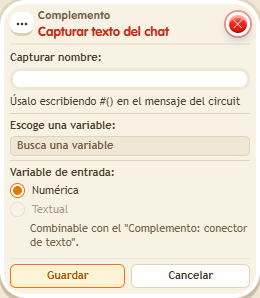
Notes
- The captured value exists only during that execution. This example does not charge currency or place a bet.
- In Addon: Capture chat text,
#(n)only matches numbers (or, in text mode, the connector's texts). If it doesn't match,Trigger: Say something doesn't fire. - What Addon: Capture chat text captures only lives in that execution.