






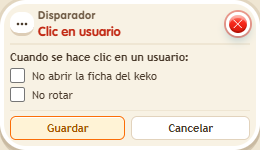
Trigger: Click a user
TriggerNo. 9122
Synopsis
The keko who clicks is the triggering user. To act on the keko who was clicked, choose the clicked-user source in the effect. Use it to pick players, mark targets or give something when you tap someone.
Step by step
Notify the keko being clicked
Boxes you need
- TriggerTrigger: Click a user
 EffectEffect: Show message
- Stack this box with “Show message” 9185, text “You were clicked”. Set the effect user source to the clicked user. Save.
- Click another keko in the room.
Result: The other keko receives “You were clicked”; you do not.
Settings
Notes
- The triggering-user source would refer to the person doing the clicking.