






Effect: Reset timers
EffectNo. 9191
Synopsis
It restarts the count of triggers such as  Trigger: Time reached or
  Trigger: Repeater: the repeater fires in the next half second and counts again from there. A delayed effect already on its way is not cancelled. It does not reset the
  Circuits clock: use
  Effect: Control clock for that. Useful to extend a wait every time someone does something.
Step by step
Restart a timed wait
Boxes you need
 TriggerTrigger: Say something
- TriggerTrigger: Time reached
 SelectorSelector: Users by type
- EffectEffect: Reset timers
 EffectEffect: Show message
- Build a stack with “At a given time”, a “Users by type” selector for all users and “Show message” saying “5 seconds have passed”. Set the timer to 5 seconds and the message to selector users.
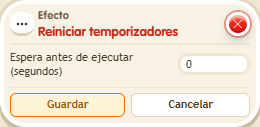
- On another tile stack “Says something” and “Reset timers”. Set “restart”, delay 0, and save.
- Say “restart”. Say it again after about two seconds.
- Wait: the message should arrive about five seconds after the latest reset.
Result: Resetting returns the trigger's elapsed time to zero; the second activation postpones the message.
Settings
Notes
- Do not confuse this effect with resetting a selected clock object: use “Control clock” for that.
- With Effect: Reset timers, the Trigger: Repeater fires in the next half second and starts counting again from there.
- Effect: Reset timers doesn't cancel a delayed effect that was already on its way.