






Trigger: Object reaches tile
TriggerNo. 9311
Synopsis
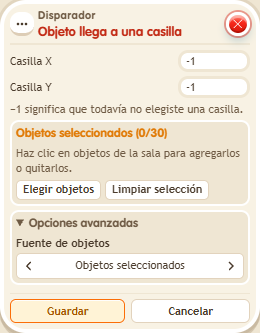
Enter the X and Y coordinates of the goal tile and choose which objects count; with none chosen, any object counts. It also works with the ball, so you can use it to score goals. Moving with the editor does not count.
Step by step
A finish tile for objects
Boxes you need
- TriggerTrigger: Object reaches tile
 TriggerTrigger: Say something
 EffectEffect: Move and rotate object
 EffectEffect: Write to log
- Place an object with a free tile to its right on the grid. Stack A: “Says something” 9111 = “move” and “Move and rotate object” 9183, one tile right, no rotation, selecting that object. Leave screen directions disabled.
- Stack B: this box selecting the same object; enter the destination tile X and Y. Add “Write to log” 9228, text “Finish”. Save.
- Say “move”, open the log in /circuits and click Refresh.
Result: Arriving at the selected tile logs “Finish”.
Settings
Notes
- Moving it to the finish with the editor does not count. A different tile does not count either.
- In Trigger: Object reaches tile the tile is written as X,Y. It works for the chosen objects (with none chosen, any object) and also for the ball, for goals.
- Moving an object with the editor doesn't fire Trigger: Object reaches tile.