






Trigger: Time reached
TriggerNo. 9105
Synopsis
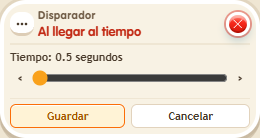
Counts from the last timer reset and runs the stack once when it reaches the time you set. Use  Effect: Reset timers to start a new count. It does not need the game clock and no keko triggers it, so add a user selector for messages.
Step by step
An alert two seconds after resetting
Boxes you need
- TriggerTrigger: Time reached
 TriggerTrigger: Say something
 SelectorSelector: Users by name
- EffectEffect: Reset timers
 EffectEffect: Show message
- Stack this box, “Users by name” 9249 with your name and “Show message” 9185 saying “Time”. Target “Users from selector”.
- Adjust the trigger until it shows 2 seconds. In another stack, set “Says something” 9111 to “again” with “Reset timers” 9191. Save.
- Say “again” and wait; repeat the word to start another countdown.
Result: You receive one alert after 2 seconds for each reset.
Settings
Notes
- This uses the circuit timer; no game timer object is needed.
 Trigger: Repeater, Trigger: Time reached,
  Trigger: Receive signal,
  Trigger: Game starts and
  Trigger: Game ends have nobody who triggers them. To show a message or teleport someone, you need a user selector.