






Effect: Control clock
EffectNo. 9231
Synopsis
It controls the  Circuits clock from your stacks. Starting fires
  Trigger: Game starts and stopping fires
  Trigger: Game ends; pausing does not end the game. If several clocks are running, stopping one does not end the game while another is still going. It is the box that starts and closes your game's matches.
Step by step
Start and pause a game

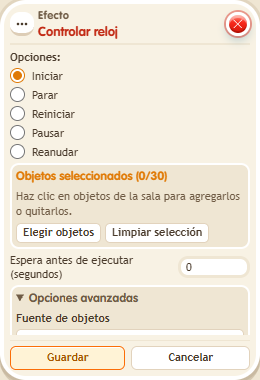
- Place a new circuit clock. Stack “Says something” (“start”) and this effect: select the clock and choose Start.
- On another tile stack another “Says something” (“pause”) and another copy of this effect: select the same clock and Pause.
- Save everything with delay 0. Say “start”, wait two seconds and say “pause”.
- In the second effect change Pause to Resume, save and say “pause” again. To finish, change it to Stop and activate once more.
Result: The clock advances, pauses, resumes and finally closes the game when stopped.
Settings
Notes
- Pause is not game end. With multiple active game clocks, stopping one does not end the game while another remains active.
- In Effect: Control clock, “start” fires Trigger: Game starts and “stop” fires Trigger: Game ends.
- The clock time never goes below 0.