






Selector: By height
SelectorNo. 9243
Synopsis
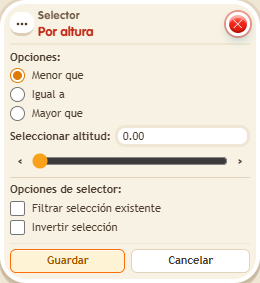
Choose the comparison and the altitude. It selects objects and users at the same time, and kekos are always at height 0. Use it with effects that read the type you need, for example to affect only what sits on a raised platform.
Step by step
Select kekos at zero height
Boxes you need
 TriggerTrigger: Say something
- SelectorSelector: By height
 EffectEffect: Show message
- Stack “Says something”, “By height” and “Show message” on the same tile. Set the trigger text to “select”.
- In the selector, choose “Equal to” and altitude “0.00”. Leave filter and invert unchecked.
- In “Show message”, enter “Selected”, use “Users from selector” and the message mode addressed only to the user. Save every box and say “select”.
Result: The room’s kekos receive the message because their height is 0.
Settings
Notes
- This selector prepares both users and objects. This example’s effect reads only the selected users.
- Selector: By height selects objects and users at once. Kekos are at height 0.