






Selector: Remote selectors
SelectorNo. 9263
Synopsis
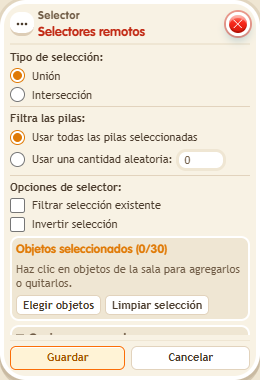
Mark the boxes of the remote stacks and choose how to combine them, for example “Union” with “Use all selected stacks”. The remote stack needs no trigger and only provides its selection. Avoid chains deeper than three levels; ideal for reusing one selection across several circuits.
Step by step
Reuse another stack’s selector
Boxes you need
 TriggerTrigger: Say something
- SelectorSelector: Remote selectors
 SelectorSelector: Users by name
 EffectEffect: Show message
- Place “Users by name” on a separate tile. Enter your name, leave filter and invert unchecked and save. That tile does not need a trigger.
- Stack “Says something”, “Remote selectors” and “Show message” on the same tile. Set the trigger text to “select”.
- In “Remote selectors”, pick the “Users by name” box on the other tile. Choose “Union” and “Use all selected stacks”.
- In “Show message”, enter “Selected”, use “Users from selector” and the message mode addressed only to the user. Save every box and say “select”.
Result: You receive the message: the current stack uses the selection calculated on the remote tile.
Settings
Notes
- The remote stack contributes its selectors; its effects do not run. Avoid chains deeper than three levels.
- The stack used by Selector: Remote selectors doesn't need a trigger: only its selectors are used. At most 3 chained levels.