






Effect: Execute stacks
EffectNo. 9209
Synopsis
You select a box on another tile and that tile's whole stack runs, even without a trigger. Calling its own stack does not create a loop. Use it to reuse one stack from several triggers or to organise large machines.
Step by step
Call a stack without a trigger
Boxes you need
 TriggerTrigger: Say something
- EffectEffect: Execute stacks
 EffectEffect: Teleport to object
- Place a walkable object B. On tile A save only “Teleport to object”, with B as its destination and the triggering user.
- On tile C stack “Says something” (“call”) and “Execute stacks”.
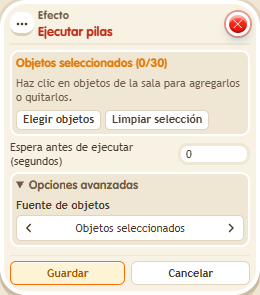
- Select the teleport box on A in “Execute stacks”. Save with delay 0.
- Say “call” from another spot.
Result: The teleport on A runs and you appear on B, even though A has no trigger.
Settings
Notes
- You select a box to identify its tile: the stack on that tile is executed.
- Effect: Execute stacks pointed at its own stack doesn't loop: that call runs without its own “execute stacks” boxes.