






Addon: Animation duration
AddonNo. 9282
Synopsis
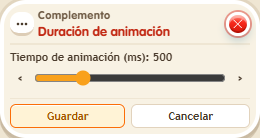
Set a time between 50 and 2000 ms (500 by default) so objects slide faster or slower. It does not change the effect's delay or the destination tile. Useful for smooth or snappy movement to suit your game.
Step by step
Make a movement last 1.2 seconds
Boxes you need
 TriggerTrigger: Say something
- AddonAddon: Animation duration
 EffectEffect: Move and rotate object
- Place an object with several free tiles to its right. On another tile stack “Says something” = “move” and “Move and rotate object”. In the effect, manually select that object, movement right, no rotation and delay 0.
- Add “Animation duration” to the stack and set it to 1200 ms.
- Save all boxes and say “move”. Wait for it to finish before repeating.
Result: The object moves one tile with a 1.2-second animation.
Settings
Notes
- The control accepts 50–2000 ms. Animation time does not change the effect’s delay.
- Addon: Animation duration goes from 50 to 2000 ms (500 by default).