






Effect: Move in a direction
EffectNo. 9184
Synopsis
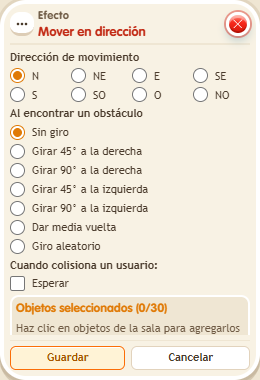
The chosen object follows a starting direction and takes one step each time the stack fires. In the window you pick the starting direction and what it does when it meets an obstacle (for example, “No turn”). Each activation is one step, so for continuous movement combine it with a  Trigger: Repeater. Handy for objects that patrol or travel along a corridor.
Step by step
Advance twice along a path
Boxes you need
 TriggerTrigger: Say something
- EffectEffect: Move in a direction
- Place a movable object with two clear tiles to the east. Stack “Says something” and “Move in direction”.
- Set the word to “advance”. Select the object, starting direction E and “No turn” in the effect.
- Leave the user-collision wait unchecked and use delay 0. Save both boxes.
- Say “advance”, wait one second and say it again.
Result: The object moves one tile per activation, ending two tiles farther along.
Settings
Notes
- Each activation takes one step; this example does not use a repeater.
- When moving or rotating, “screen” uses screen directions: up is up on the screen.
- “Don't collide” doesn't let the object go where there's already another object.
- “Don't stack” doesn't let a walkable object land on another walkable object.
- “Random” makes the object jump to any free tile in the zone.