






Effect: Change opacity
EffectNo. 9214
Synopsis
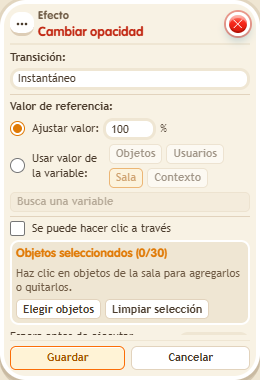
Choose the opacity, the transition type and who sees the change. With “free tiles” and “All users in the room”, at 0% the object stops blocking and you can walk where it was; any higher opacity makes it block again and moves whoever is on top. When the island reloads the object blocks again. Ideal for ghost walls or secret passages.
Step by step
Make an object translucent
Boxes you need
 TriggerTrigger: Say something
- EffectEffect: Change opacity
- Place a visible object. Stack “Says something” (“fade”) and “Change opacity”.
- Select only that object, fixed value 50%, instant transition and all room users.
- Leave click-through and tile release unchecked. Save with delay 0.
- Say “fade” and inspect the object with another keko. Change the value to 100%, save and activate again to restore it.
Result: Both see the object at 50% opacity; the second configuration restores 100%.
Settings
Notes
- Lower opacity does not free the ground by itself. Test tile release separately with 0% and all room users.
- In Effect: Change opacity with “free tiles”, at 0% the object stops blocking and you can walk where it was. Any higher opacity makes it block again and pushes off whoever was on it.
- “Free tiles” only works with “all users in the room”. When the island reloads, the object blocks again.