






Reference variable
VariableNo. 9294
Synopsis
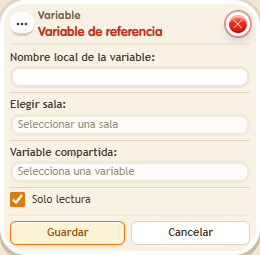
You give it a local name and choose the source zone and variable; only shared variables from your other zones appear, and only the owner configures it. With “Read only” the original cannot be changed. If the source zone is not loaded, the last saved value is read. Great for treasures, rankings or progress that links several zones.
Step by step
Read a counter from another room you own
Boxes you need


- In room A, which you own, create a Room variable named “treasure” and choose “Permanent, shared between rooms”. Save.
- In A, build a “Says something” = “chest” stack with “Change variable value”: Room, treasure, add 5. Save and say “chest” once.
- In another room B you own, open the Reference variable. Use “treasure_ref” as its local name, select A and the treasure variable from the lists, keep “Read only” enabled and save.
- In B, stack “Says something” = “balance”, “Variable text” and “Show message”. For the text choose Room → treasure_ref, numeric output and the name “balance”. Set the message for the triggering user to “Treasure: $(balance)”. Save everything and say “balance”.
Result: B shows “Treasure: 5” by reading A's shared variable without creating a separate counter.
Settings
Notes
- Only shared variables from your other rooms are listed. A read-only reference prevents changes. If the source room is not loaded, the last stored value is read.
- Reference variable can point to a shared variable in another zone of the same owner even if that zone isn't open: it reads the last saved value.
- A variable belongs to its zone. To use it in another one, make it shared and create a Reference variable; only the owner can set it up.
- A read-only Reference variable doesn't write.