






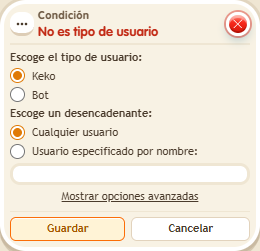
Condition: Not a user type
ConditionNo. 9178
Synopsis
The opposite of  Condition: User type: with a name, it lets everyone through except that account. Enter the exact username, not a zone or object name. Useful to keep one specific player out of an activity.
Step by step
Exclude a user by name
Boxes you need
 TriggerTrigger: Say something
- ConditionCondition: Not a user type
 EffectEffect: Show message
- Stack “Says something” 9111, this condition and “Show message” 9185. Set the trigger to “hello”, exact match; set the effect to “Matched”, targeting the triggering user.
- Choose the player type and “User specified by name”; enter your exact username.
- In advanced settings, compare the triggering user with the user specified by name. Save.
- Say “hello” with your account and have another person with a different name say the same thing.
Result: The message appears for the other person but not for the account whose name you excluded.
Settings
Notes
- This check compares usernames. Do not use the room name or an object name.