






Object variable
VariableNo. 9290
Synopsis
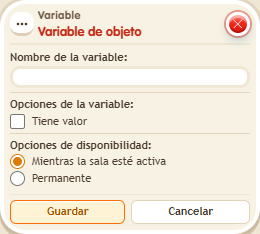
You give it a name, tick whether it “Has value” and choose how long it lasts (for example, “While the room is active” or permanent). Then you give it to objects with  Effect: Give variable and change it with
  Effect: Change variable value. Picking up an object and placing it again in the same zone keeps its value, but picking up the variable box deletes the definition and all its values.
Step by step
An object with three lives
Boxes you need
 TriggerTrigger: Say something
- EffectEffect: Give variable
- EffectEffect: Change variable value
- Place object A. On another tile, open the Object variable, name it “life”, enable “Has value”, select “While the room is active” and save.
- Build a stack with “Says something” = “arm” and “Give variable”. In the effect choose Objects, the life variable, selected objects as the source and only A; use a fixed initial value of 3 and save.
- On another tile, build “Says something” = “hit” with “Change variable value”. Select life under Objects, subtract and a fixed value of 1. Use the primary object set and select A. Save.
- Say “arm”. Open /circuits → Variables, find life and inspect its value. Then say “hit” and click Refresh to inspect its value again.
Result: A receives life = 3 and the hit reduces it to 2. Another object without the variable does not gain lives from “Change value”.
Settings
Notes
- Picking up the variable box deletes its definition and all object values. Picking up only A preserves its value within the same zone.
- Picking up an object and placing it again in the same zone keeps its variable.
- Picking up the variable's box deletes the variable and all its saved values. When you place it again, it's empty.