






Effect: Send signal on failure
EffectNo. 9212
Synopsis
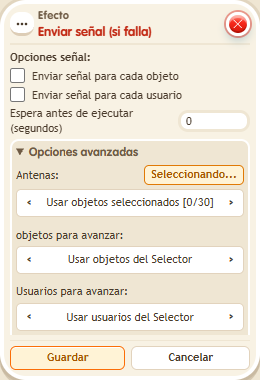
Same as  Effect: Send signal, but the signal is only sent when its stack's conditions are not met. You set the same options: antennas, users or objects sent, and one signal per item or a single one. Useful to tell another part of your machine that someone missed a requirement.
Step by step
Signal a failed condition
Boxes you need
 TriggerTrigger: Say something
 TriggerTrigger: Receive signal
 ConditionCondition: User on object
- EffectEffect: Send signal on failure
 EffectEffect: Teleport to object

- Place an antenna and a walkable object B. On one tile stack “Receives signal” and “Teleport to object”: select the antenna in the trigger and B in the effect; target the triggering user.
- On another tile stack “Says something” (“signal”) and this effect, along with “User on object” selecting a separate walkable object A.
- Leave one-signal-per-object/user unchecked. Under Antennas choose selected objects, activate its button and select the antenna. For forwarded users choose the triggering user. Save with delay 0.
- Say “signal” while not on A. Then test again while standing on A.
Result: The signal takes you to B only when you are not on A.
Settings
Notes
- Both selections must use the same antenna. The forwarded user source preserves this test's participant.