






Condition: Number of users that stepped on object
ConditionNo. 9313
Synopsis
Each firing counts the keko who triggered it, without repeats. When it reaches the chosen number it passes, the count resets to 0 and the counted kekos become the “users from selector”, so the effects reach all of them. The count is lost when the island reloads.
Step by step
Count two different people stepping on an object
Boxes you need
 TriggerTrigger: Step on an object
- ConditionCondition: Number of users that stepped on object
 EffectEffect: Show message
- Place a rug. Stack “User steps on object” 9117, this condition and “Show message” 9185. Select the rug in the trigger.
- Set the condition to 2 users. Set the effect’s text to “There are two of us” and change its user source to “Use users from Selector”. Save everything.
- Step onto the rug, step off, and step onto it again with the same account: no message should appear yet. Step off and have another person step on it.
Result: When the second person steps on it, both receive the message and the count starts again.
Settings
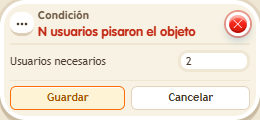
Notes
- It counts distinct people, not steps. This condition passes the counted users to the effect; do not add a selector that replaces that list.
- Condition: Number of users that stepped on object records whoever triggered the stack, without repeats, and is met once N different kekos are reached.
- When Condition: Number of users that stepped on object is met, the count goes back to 0 and the counted kekos become the “selector users”: effects with that source reach all of them.
- The Condition: Number of users that stepped on object count is lost when the island reloads.