






Condition: Time greater than
ConditionNo. 9162
Synopsis
The partner of  Condition: Time less than: set the limit with the slider and restart the count with
  Effect: Reset timers. Remember the half-second margin at the edge. Use it for actions only allowed after a wait, such as opening a door after a countdown.
Step by step
Respond after the time limit
Boxes you need
 TriggerTrigger: Say something
- ConditionCondition: Time greater than
 EffectEffect: Show message
- EffectEffect: Reset timers
- Stack “Says something” 9111, this condition and “Show message” 9185. Set the trigger to “hello”, exact match; set the effect to “Matched”, targeting the triggering user.
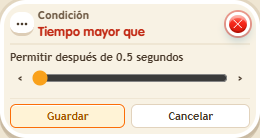
- Set this condition’s slider to 3 seconds.
- In another stack, configure “Says something” 9111 with “reset”, exact match, and “Reset timers” 9191. Save both stacks.
- Say “reset” and immediately say “hello”. Wait 5 seconds after the reset and say “hello” again.
Result: The first check shows no message; the check at 5 seconds does.
Settings
Notes
- The limit includes an extra half second: with 3 seconds in the window, both time conditions match at exactly 3.5 seconds. Do not treat them as mutually exclusive branches at that instant.