






Room variable
VariableNo. 9292
Synopsis
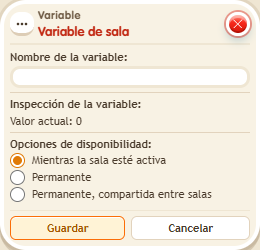
It exists from the moment you save it, starting at 0, so you do not need to give it. Everyone who changes it modifies the same number. With “Permanent” it keeps its value when the island reloads, and with “Permanent, shared between rooms” your other zones can read it with  Reference variable. Great for rounds, shared pots or global counters.
Step by step
A round counter for the whole room
Boxes you need


- Configure a new Room variable named “round” with availability “While the room is active”. Save it: its initial value is 0.
- On another tile, stack “Says something” = “round”, “Change variable value”, “Variable text” and “Show message”.
- In “Change value”, choose the Room scope, the round variable and add a fixed value of 1.
- In “Variable text”, choose round from the Room scope, numeric output and the text name “round”. Set the message to “Round $(round)” for the triggering user. Save everything.
- Say “round”, then ask another person to say it.
Result: You receive “Round 1” and the other person receives “Round 2”: both increment the same counter.
Settings
Notes
- The room variable already exists after saving. You do not need “Give variable”. Choosing Permanent preserves its value when the room reloads.
- The Room variable always exists: it's 0 from the moment it's set up.
- Picking up the variable's box deletes the variable and all its saved values. When you place it again, it's empty.