






Addon: Count object types in chest
AddonNo. 9288
Synopsis
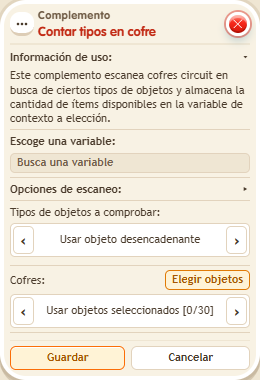
You mark a reference copy of the object type, choose the  Object chest and a variable to hold the result, which is stored before conditions are checked. Only what is inside the chest counts. Use a chest you own with circuits use enabled. Useful for shops with stock or prizes that run out.
Step by step
Count an object type inside a chest
Boxes you need
 TriggerTrigger: Say something
- AddonAddon: Count object types in chest
 AddonAddon: Variable value in text
 EffectEffect: Show message

- Prepare an object chest you own, with circuits use enabled and unlocked. Deposit two identical objects; place a third copy of the same type and colours as a reference.
- Configure a “Context variable” named “quantity”, with a value. On another tile stack “Says something” = “count”, “Count types in chest”, “Variable text” and “Show message”.
- In the scanner choose “quantity” and “Scan all chest objects”. For “Object types to check”, use the primary manual selection and pick the reference copy; for “Chests”, use the secondary selection and pick the chest.
- In “Variable text”, use Context, “quantity”, numeric individual output and identifier “n”. Set the message to “Remaining: $(n)”, only for the triggering user. Save and say “count”.
Result: You read “Remaining: 2”. The reference copy outside the chest is not counted.
Settings
Notes
- The result is stored in context before conditions are evaluated. Use your own chest and enable its use in circuits.