






Effect: Bot speaks
EffectNo. 9224
Synopsis
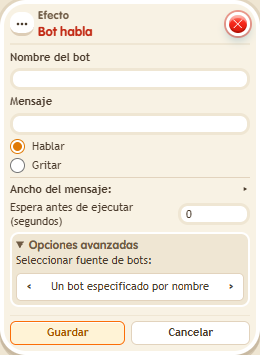
Type the bot's name and a message of up to 200 characters for it to say out loud. Use a trigger word different from the bot's text so the same command is not repeated. Great for announcements, narrators or game hosts. To speak to one person only, use  Effect: Bot speaks to user.
Step by step
A bot's announcement
Boxes you need
 TriggerTrigger: Say something
- EffectEffect: Bot speaks
- Place your own bot named “Guide”. Stack “Says something” (“guide”) and this effect.
- Enter “Guide” as the name and “The exit is on the right” as the message. Keep the bot source set to name.
- Choose Talk, delay 0, and save.
- Say “guide” while another keko watches.
Result: The bot announces the message in the area.
Settings
Notes
- Messages can have up to 200 characters. The trigger word differs from the bot's message to avoid repeating the same command.