






Effect: Give user points
EffectNo. 9197
Synopsis
Despite its name, the points go to the user's team, not to a personal counter; if they have no team, they go to a “no team” pool. It only adds points while a game is running. Use it when each player scores for their team, for example by making a goal. For individual points use a variable with  Effect: Change variable value.
Step by step
Add 5 points to the speaker's team
Boxes you need
 TriggerTrigger: Say something
 TriggerTrigger: Team reaches a score
- EffectEffect: Give user points
 EffectEffect: Join team
 EffectEffect: Control clock
 EffectEffect: Write to log

- Prepare a “Says something” (“team”) + “Join team” stack: red, Circuits type and triggering user. Save and say “team”.
- Place a circuit clock. Prepare another “Says something” (“start”) + “Control clock” stack: select that clock, choose Start and save.
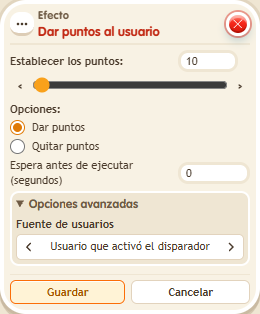
- In a third stack combine “Says something” (“point”) with this effect. Set 5 points, “Give points” and triggering user. Use delay 0 and save.
- Prepare a verification stack with “Score reached”: red team and 5 points; add “Write to log”, INFO level, with “Red reached five”. Save.
- Say “start”, then “point”. Open /circuits → Log and refresh.
Result: The red team goes from 0 to 5 during the game, and the verification entry appears.
Settings
Notes
- Despite its name, this effect adds to the triggering user's team; it does not create a personal points wallet. It does nothing outside an active game.
- Effect: Give user points adds to the triggering user's team; if they have no team, it goes to a “no team” pot.