






Addon: Variable value in text
AddonNo. 9280
Synopsis
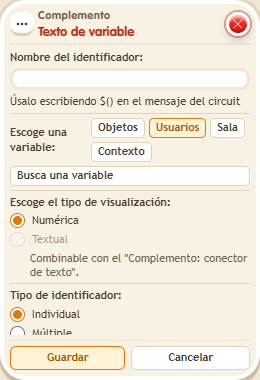
You define an identifier and use it as $(name) in a message. You choose the scope (users, objects, room or context), who holds the variable and whether it shows as a number or as text (with  Addon: Variable text connector); scope and source must match whoever holds the variable. Great for notices like “You have 10 points”.
Step by step
Insert a variable value into a message
Boxes you need
 TriggerTrigger: Say something
- AddonAddon: Variable value in text
 EffectEffect: Give variable
 EffectEffect: Show message

- Configure a “User variable” named “points”, with a value. On another tile stack “Says something” = “points”, “Give variable”, “Variable text” and “Show message”.
- In “Give variable”, choose “points”, triggering user, initial value 5 and no overwrite.
- In “Variable text”, choose Users scope, triggering user, “points”, Numeric mode, Individual and identifier “total”.
- Set the message to “You have $(total) points”, for the triggering user only. Save and say “points” with a user who does not have this variable.
Result: The message shows “You have 5 points”.
Settings
Notes
- The text scope and source must match the variable holder; typing the variable name into the message is not enough.
- Within a stack, variables are given first, then changed, then removed. Messages read the result; box height does not change this order.
Related
Used in these recipes