






Addon: Variable text connector
AddonNo. 9271
Synopsis
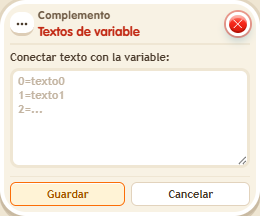
You write one line per value in the form value=text, up to 30 lines; if any line is wrong, nothing is saved. It goes on the same tile as the box that defines the variable. Then  Addon: Variable value in text in “Text” mode shows the text instead of the number; a value without text shows as a number. Great for ranks, level names or states.
Step by step
Turn a number into a rank
Boxes you need
 TriggerTrigger: Say something
- AddonAddon: Variable text connector
- AddonAddon: Variable value in text
 EffectEffect: Give variable
 EffectEffect: Show message

- Configure a “User variable” named “rank”, with a value. Put “Variable text connector” on the same tile; enter “1=Beginner” and “2=Expert” on separate lines and save.
- In another stack, combine “Says something” = “rank”, “Give variable”, “Variable text” and “Show message”. Give “rank” to the triggering user with initial value 2 and no overwrite.
- In “Variable text”, choose Users scope, triggering user, “rank”, “Textual” display, “Individual” type and identifier “rank_txt”.
- Set the message to “You are $(rank_txt)”, for the triggering user only. Save and say “rank” with a keko who does not have this variable yet.
Result: The message says “You are Expert” although the stored value is 2.
Settings
Notes
- The connector shares a tile with the variable definition. The text-reading extra shares a tile with the message. An unmapped value is displayed as a number.
- In Addon: Variable text connector write “value=text”, one line per value, up to 30 lines. If one line is wrong nothing is saved, and there's no warning.
- In Addon: Variable text connector, a value without text is shown as a number.