






Effect: Adjust clock
EffectNo. 9230
Synopsis
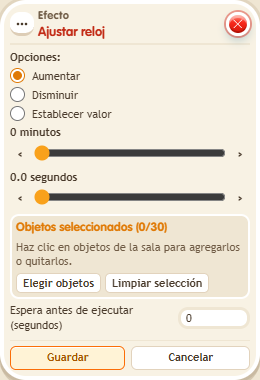
Choose the  Circuits clock, the operation (“Set value”, “Increase” or subtract) and the minutes and seconds, with half seconds. Time never goes below zero. Changing the time does not start the game: use
  Effect: Control clock for that. Useful for time bonuses or penalties.
Step by step
Set a clock to ten seconds

- Place a circuit clock without starting it. Stack “Says something” (“ten”) and “Adjust clock”.
- Select only that clock. Choose “Set value”, 0 minutes and 10.0 seconds.
- Save with delay 0 and say “ten”. Read the clock's time.
- Change the operation to Increase, keep 0 minutes and 10.0 seconds, save and say “ten” again.
Result: The first activation sets 10 seconds and the second increases the clock to 20.
Settings
Notes
- Changing time is not the same as starting a game. The seconds control allows half seconds; time never goes below zero.
- The clock time never goes below 0.