






Selector: Users by team
SelectorNo. 9246
Synopsis
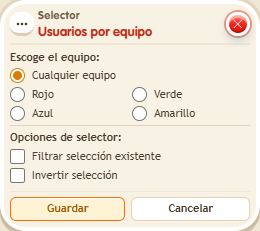
Choose the team colour or “Any team”, which takes everyone who has a team and leaves out those without one. Ideal to notify, move or reward a whole team at once.
Step by step
Call the red team
Boxes you need
 TriggerTrigger: Say something
- SelectorSelector: Users by team
 EffectEffect: Show message
 EffectEffect: Join team
- Prepare a separate stack with “Says something” = “red” and “Join team” = red, targeting the triggering user. Save and ask one person to say “red”; another should remain without a team.
- Stack “Says something”, “Users by team” and “Show message” on the same tile. Set the trigger text to “select”.
- Choose the red team in the selector and leave filter and invert unchecked.
- In “Show message”, enter “Selected”, use “Users from selector” and the message mode addressed only to the user. Save every box and say “select”.
Result: Only members of the red team receive the message.
Settings
Notes
- “Any team” selects users who belong to a team; users without a team are excluded.