






Trigger: Variable changes
TriggerNo. 9127
Synopsis
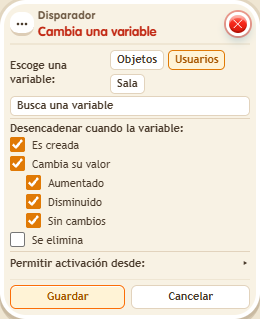
Pick the type and the variable, and which change counts: “Created” or “Value changes”, with options such as “Increased”. “Increased” ignores subtractions, and “Created” only fires the first time it is received. A “while the user is in the room” variable is erased on leaving without firing this trigger.
Step by step
Announce a points increase
Boxes you need
- TriggerTrigger: Variable changes
 TriggerTrigger: Say something
 EffectEffect: Give variable
 EffectEffect: Change variable value
 EffectEffect: Show message
- Save a user variable
 9291 named “points”, with “Has a value” and “While the user is in the room”. In one stack, use “Says something” 9111 = “add”, “Give variable” 9237 to the triggering user, initial 0 without overwriting, and “Change value” 9239, Add 5.
 - Stack this box and “Show message” 9185, text “Increased”, targeting the triggering user. In the trigger choose Users, select “points”, check “Value changes” and “Increased”, and allow activation from “This room”. Save.
- Say “add” twice.
Result: Each increase shows “Increased”.
Settings
Notes
- “Increased” does not respond to subtraction; “Created” is a separate event.
- In Trigger: Variable changes, “increased” doesn't fire when the value goes down.
- In Trigger: Variable changes, “created” only fires the first time the player receives the variable.
- A “while in room” variable is quietly deleted on leaving, without firing Trigger: Variable changes.