






Selector: Objects with variable
SelectorNo. 9260
Synopsis
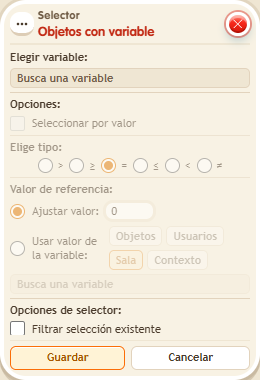
Choose the object variable and, optionally, “Select by value” with an operator and a value. The variable must exist before the firing that runs the selector. Useful to move or change only marked pieces, such as tiles already visited.
Step by step
Select objects with at least 5 points
Boxes you need
 TriggerTrigger: Say something
- SelectorSelector: Objects with variable
 EffectEffect: Give variable
 EffectEffect: Offset object position

- Configure an “Object variable” named “points”, with a value. Place two objects A and B with free destinations to their right.
- In another stack, use “Says something” = “load” and “Give variable”: choose “points”, initial value 5, no overwrite, object A by manual selection. Save and say “load”.
- Build the test stack with “Says something” = “move”, “Objects with variable” and “Move object by offset”. Choose “points”, enable “Select by value”, operator ≥ and fixed value 5.
- In “Move object by offset”, use “Objects from selector”, X to the right by 1 tile, Y by 0 and delay 0. Save every box and say “move”. Keep each destination tile free.
Result: A, which has 5 points, moves; B does not.
Settings
Notes
- The variable must exist before the trigger that evaluates the selector. Giving it in that same stack happens too late for this selection.