






Selector: Users on objects
SelectorNo. 9258
Synopsis
Select the objects; only those on top at the moment of firing are picked. Ideal to reward whoever is on the podium, move everyone on a platform or notify players waiting on a mat.
Step by step
Notify users standing on a rug
Boxes you need
 TriggerTrigger: Say something
- SelectorSelector: Users on objects
 EffectEffect: Show message
- Place a walkable rug A. Ask one person to stand on it and another to wait off it.
- Stack “Says something”, “Users on objects” and “Show message” on the same tile. Set the trigger text to “select”.
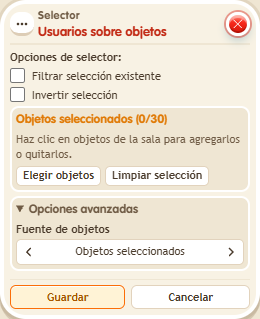
- Pick only A in the selector. Leave filter and invert unchecked.
- In “Show message”, enter “Selected”, use “Users from selector” and the message mode addressed only to the user. Save every box and say “select”.
Result: Only users standing on A receive the message.
Settings
Notes
- Leave “Filter existing selection” and “Invert selection” unchecked for this test.
- If you target selected users and the selector is empty, the effect reaches nobody. The person who triggered the stack is not used as a fallback.